How much time does your IT team waste switching between monitoring dashboards, ticketing platforms, security tools, and endpoint management systems? When these applications operate separately, even simple tasks can require multiple manual steps. Cross tool automation helps businesses overcome this challenge by connecting different software platforms and allowing information, alerts, and actions to move between them automatically.
Modern organizations depend on many technologies to manage infrastructure, cybersecurity, employee support, and business operations. However, disconnected tools can create delays, duplicate work, and limited visibility. By combining IT workflow automation, IT automation tools, API integration, and IT service management automation, businesses can improve operational efficiency while maintaining stronger control over their technology environments.
For IT managers, cybersecurity professionals, Managed Service Providers (MSPs), and business leaders, cross tool automation provides a practical way to simplify complex operations and support business growth.
What is Cross Tool Automation
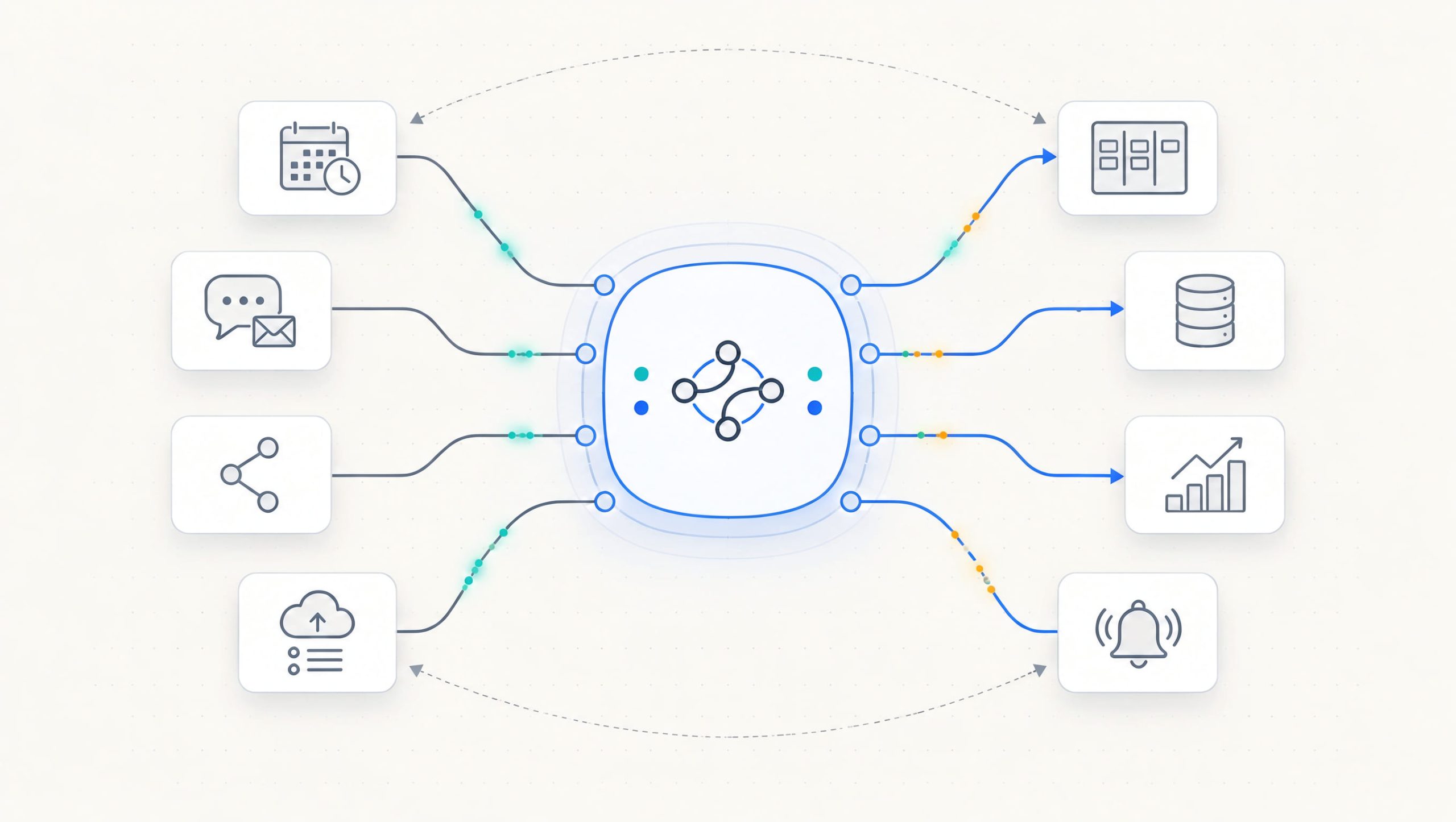
Cross tool automation is the process of connecting multiple software applications so they can exchange information and complete tasks through coordinated workflows. Instead of requiring employees to move data manually between platforms, automation allows one system to trigger actions in another.
For example, a monitoring platform may detect a server problem and automatically create a ticket in a service desk system. The ticket can then be assigned to a technician, linked to the affected device, and updated when the issue is resolved.
Common systems involved include:
- Remote Monitoring and Management platforms
- IT service desk software
- Endpoint management tools
- Cybersecurity monitoring systems
- Cloud management platforms
- Asset management databases
- Identity and access management systems
- Communication applications
- Reporting and analytics platforms
The main objective is to create connected processes that reduce unnecessary manual effort.
Why Cross Tool Automation Matters
IT environments are becoming more complex as organizations adopt cloud applications, remote work technologies, and specialized security platforms. Each tool may perform its assigned function effectively. However, problems arise when those tools cannot communicate.
Common challenges include:
- Duplicate data entry
- Delayed incident response
- Inconsistent information
- Repetitive administrative tasks
- Missed notifications
- Poor workflow visibility
- Increased operational costs
- Limited collaboration between teams
Cross tool automation helps address these issues by connecting systems and standardizing how work moves between them. For example, a security alert may require an IT technician to investigate a device. Without integration, the security team must manually communicate the issue. An automated workflow can create a ticket and include the relevant device and alert information. This reduces delays and improves accountability.
Key Benefits of Cross Tool Automation
Improved Operational Efficiency
Manual data transfer consumes valuable employee time. Automated workflows allow information to move between applications without repeated administrative work.
Faster Incident Response
When monitoring and ticketing platforms communicate, important alerts can reach technicians more quickly.
Reduced Human Error
Manual processes increase the risk of missing information or entering incorrect details. Automation can improve consistency through predefined rules.
Better Team Collaboration
Connected systems help IT operations, security teams, and service desk technicians work with shared information.
Greater Scalability
Cross tool automation allows organizations to manage increasing workloads without relying entirely on additional staffing.
How Cross Tool Automation Works
A typical cross tool automation process involves triggers, integrations, conditions, and actions.
1. Identify a Trigger
A trigger is an event that starts an automated workflow. Examples include a monitoring alert, a new support ticket, or a change in device status.
2. Exchange Information
Connected systems share relevant data through APIs, webhooks, or supported integrations.
3. Evaluate Conditions
The workflow checks predefined rules. For example, an alert may require a specific severity level before generating a high-priority ticket.
4. Execute an Action
The system performs an approved task, such as creating a ticket, sending a notification, or updating an asset record.
5. Record the Result
The workflow documents its actions and reports success or failure.
6. Notify Responsible Teams
Technicians or administrators receive updates when further action is required. This structured process helps organizations automate work while maintaining visibility.
API Integration in Cross Tool Automation
API integration plays an important role in connecting software platforms. An Application Programming Interface allows applications to exchange information through defined requests and responses. For example, a monitoring system may use an API to send incident information to a ticketing platform. The receiving system can create a support request using that information.
Common API Integration Use Cases
- Creating service tickets
- Updating endpoint records
- Retrieving device information
- Synchronizing user details
- Sending monitoring alerts
- Generating reports
- Updating incident status
Secure API Integration Practices
Organizations should protect integrations through:
- Strong authentication
- Limited API permissions
- Encrypted connections
- Secure credential storage
- Access monitoring
- Regular credential rotation
- Error handling
- Audit logging
Poorly secured integrations can introduce unnecessary security risks.
IT Automation Tools for Connected Operations
IT automation tools help businesses execute predefined tasks without constant manual intervention. Some tools focus on specific activities, while others coordinate workflows across multiple systems.
Common capabilities include:
- Script execution
- Scheduled tasks
- Event-based triggers
- Workflow orchestration
- API connections
- Conditional actions
- Automated notifications
- Reporting
Reduce Repetitive Maintenance
Consider an IT team responsible for monitoring hundreds of endpoints. When a device reports low disk space, technicians may need to investigate the problem, create a ticket, and perform maintenance. An automated workflow can collect device information, generate a support request, and notify the assigned technician. Where approved, the system may also execute a safe maintenance script. This reduces unnecessary administrative work.
Cross Tool Automation and IT Service Management
IT service management automation helps organizations deliver consistent technical services through structured workflows. ITSM processes often involve multiple platforms, including monitoring, ticketing, asset management, and identity systems. Cross tool automation can connect these processes.
Incident Management
Monitoring alerts can create tickets with relevant technical information.
Service Request Management
Approved employee requests can trigger predefined fulfillment activities.
Change Management
Automation can document changes, request approvals, and update configuration records.
Asset Management
Device information can be synchronized between endpoint management and asset inventory systems.
Knowledge Management
Resolved incidents can help identify opportunities to create or improve support documentation. These integrations reduce duplicate work and improve operational consistency.
Cross Tool Automation for Cybersecurity
Cybersecurity operations often depend on multiple technologies. Organizations may use endpoint protection, identity management, vulnerability scanners, firewalls, and security monitoring platforms. When these systems operate independently, security teams may struggle to coordinate investigations. Cross tool automation helps connect security alerts with operational response processes.
Example: Suspicious Endpoint Activity
Consider an endpoint protection platform detecting suspicious behavior.
A connected workflow may:
- Receive the security alert.
- Identify the affected endpoint.
- Retrieve relevant asset information.
- Create a security incident ticket.
- Notify authorized personnel.
- Request approval for containment.
- Record remediation actions.
- Update the incident status.
This improves coordination between security analysts and IT technicians. However, potentially disruptive actions, such as isolating critical servers, should follow approved response procedures.
Cross Tool Automation and Endpoint Management
Endpoint management platforms help organizations maintain computers, servers, and other supported devices. These platforms commonly provide monitoring, patch deployment, software management, and device inventory. Connecting endpoint management with other applications creates additional operational value.
For example:
- Monitoring alerts can create support tickets.
- Patch failures can trigger notifications.
- Device inventory changes can update asset records.
- Security findings can generate remediation tasks.
- Completed maintenance can update service reports.
Cross tool automation helps keep related systems synchronized. This is particularly useful for organizations managing large or distributed endpoint environments.
Remote Monitoring and Management Integration
Remote Monitoring and Management platforms provide centralized visibility into endpoint health and performance. RMM integrations can connect technical monitoring with service desk and security workflows.
Example: Automated Incident Handling
A server monitoring tool detects a failed service.
The workflow can:
- Generate an alert.
- Check the alert severity.
- Create a support ticket.
- Attach device information.
- Assign the ticket to a technician.
- Send a notification.
- Update the ticket after remediation.
This process reduces the need for manual coordination. It also helps technicians maintain accurate incident records.
Cross Tool Automation for Managed Service Providers
MSPs support multiple customers with different infrastructure and service requirements. As customer environments grow, disconnected systems can create operational bottlenecks. Cross tool automation helps MSPs standardize workflows across monitoring, support, endpoint management, and reporting platforms.
Potential benefits include:
- Faster ticket creation
- Reduced manual administration
- Improved technician productivity
- Consistent customer onboarding
- Better service reporting
- Stronger incident coordination
- Improved SLA management
- More efficient resource utilization
Maintain Customer Separation
MSPs should ensure that integrations preserve customer-specific access controls. Automation must not accidentally transfer information or perform actions across unrelated customer environments. Clear permissions and testing are essential.
Common Challenges in Cross Tool Automation
Although automation offers important benefits, implementation requires careful planning.
Integration Compatibility
Not every platform provides the APIs or connectors required for a specific workflow.
Data Inconsistency
Different systems may use different naming conventions, identifiers, and data formats.
Security Risks
Poorly configured integrations may expose sensitive information or grant excessive permissions.
Workflow Complexity
Overly complicated automation can become difficult to maintain.
Error Handling
Failed integrations may create incomplete tickets, outdated records, or missed notifications.
Limited Visibility
Without proper logging, administrators may struggle to understand why a workflow failed. Organizations should address these challenges before expanding automation.
Best Practices for Cross Tool Automation
1. Identify High-Value Processes
Start with repetitive activities that consume significant employee time.
2. Map Existing Workflows
Document triggers, responsibilities, required information, and expected outcomes.
3. Select Compatible Tools
Verify that platforms support the necessary integrations.
4. Apply Least-Privilege Access
Grant automation accounts only the permissions required for their tasks.
5. Test Before Deployment
Validate workflows in controlled environments.
6. Include Error Handling
Create procedures for failed actions, duplicate requests, and unavailable services.
7. Maintain Audit Logs
Record important workflow activities for troubleshooting and accountability.
8. Review Automation Regularly
Update workflows when applications, policies, or business requirements change. These practices help maintain reliable and secure automation.
Key Metrics to Measure Automation Success
Businesses should measure whether cross tool automation improves operational performance.
Useful metrics include:
- Time Saved: Reduction in manual processing time.
- Workflow Success Rate: Percentage of automated tasks completed successfully.
- Error Rate: Frequency of failed or incorrect actions.
- Incident Response Time: Time required to begin responding to technical issues.
- Ticket Resolution Time: Average time needed to resolve support requests.
- Manual Intervention Rate: Percentage of workflows requiring employee involvement.
- Cost per Workflow: Estimated expense associated with completing a process.
- Automation Coverage: Percentage of suitable processes supported by automation.
Reviewing these metrics helps organizations identify improvements and justify technology investments.
Actionable Steps to Implement Cross Tool Automation
Organizations can begin with a practical implementation plan:
- Review existing IT applications and workflows.
- Identify repetitive manual activities.
- Select one high-value automation use case.
- Confirm integration compatibility.
- Define workflow triggers and conditions.
- Establish security permissions.
- Create and test the integration.
- Configure error handling and notifications.
- Measure operational improvements.
- Expand automation gradually.
For example, connecting monitoring alerts with service desk tickets is often a practical starting point. Once the workflow performs reliably, businesses can introduce additional integrations.
Frequently Asked Questions
Q1: What is cross tool automation?
Cross tool automation is the process of connecting different software applications so they can exchange information and complete coordinated tasks automatically.
Q2: Why is cross tool automation important for IT teams?
It reduces repetitive work, improves communication between platforms, accelerates incident response, and helps technicians manage complex environments more efficiently.
Q3: What technologies support cross tool automation?
Common technologies include APIs, webhooks, workflow orchestration platforms, scripting tools, RMM systems, ITSM software, and automation connectors.
Q4: Can cross tool automation improve cybersecurity?
Yes. It can connect security alerts with incident management, endpoint information, and approved response workflows. Proper access controls and monitoring remain essential.
Q5: Is cross tool automation useful for small businesses?
Yes. Small businesses can automate routine support requests, notifications, user administration, and reporting to reduce manual workloads and improve service consistency.
Final Thoughts
Modern businesses rely on multiple technology platforms to manage infrastructure, support employees, maintain security, and deliver reliable services. When these applications operate independently, manual processes can slow operations and create unnecessary complexity.
Cross tool automation helps organizations connect their technology systems and create coordinated workflows. By reducing repetitive tasks, improving information sharing, and supporting faster incident response, it provides a practical foundation for efficient IT operations. Combining IT workflow automation, IT automation tools, API integration, and IT service management automation allows businesses to improve productivity while maintaining better control over their environments.
With the right strategy, cross tool automation can help IT teams reduce operational costs, strengthen service delivery, and support long-term business growth.
Secure your infrastructure better — launch your free ITarian trial

 Loading...