Every business device has a lifespan, but many organizations lose visibility somewhere between purchase and retirement. Laptops change owners, software becomes outdated, warranties expire, and forgotten devices can remain connected to corporate resources. Device lifecycle management solves this challenge by creating a structured process for managing technology from acquisition through secure disposal. With effective IT asset management, endpoint management, device inventory management, and asset lifecycle management, organizations can reduce unnecessary costs, improve cybersecurity, and keep employees productive. For IT managers, cybersecurity teams, MSPs, CEOs, and business leaders, a consistent lifecycle strategy creates greater control over an increasingly distributed technology environment.
What is Device Lifecycle Management
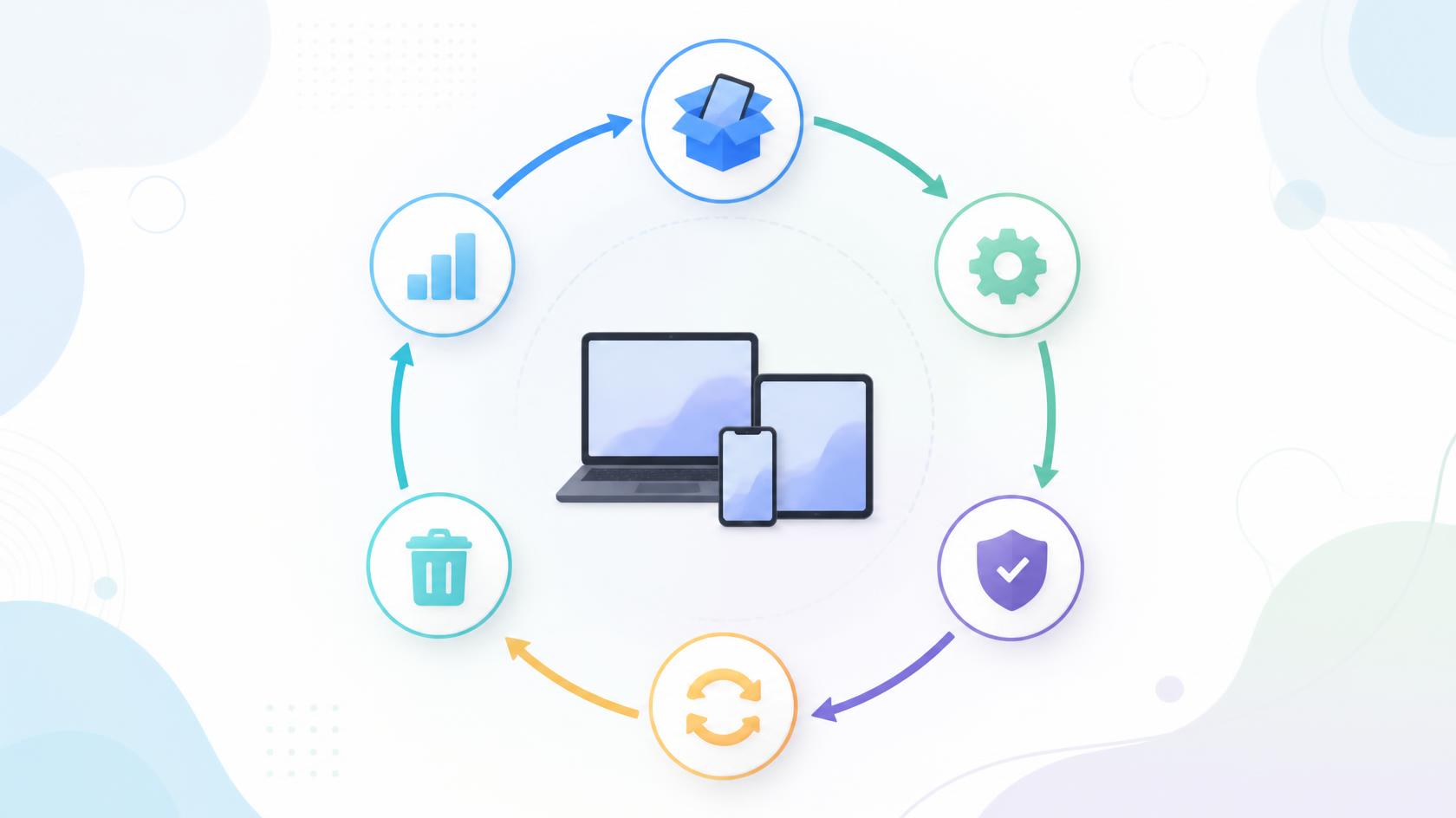
Device lifecycle management is the process of planning, acquiring, deploying, maintaining, securing, tracking, and retiring devices throughout their useful lives.
The process can cover many types of technology, including:
- Desktop computers
- Laptops
- Smartphones
- Tablets
- Servers
- Network equipment
- Remote workstations
- Specialized business devices
Instead of treating procurement, support, security, and disposal as unrelated activities, device lifecycle management connects them into one continuous process.
This gives organizations a clearer picture of where each device is, who uses it, whether it meets security requirements, and when it should be replaced.
The Main Stages of Device Lifecycle Management
A strong lifecycle process begins before a device reaches an employee and continues after that device stops being used.
Planning and Procurement
The first stage involves identifying business needs and selecting suitable devices.
Teams should consider:
- Employee roles
- Performance requirements
- Security standards
- Operating system requirements
- Support needs
- Expected device lifespan
- Budget
Standardizing hardware models where practical can make ongoing support easier.
Procurement decisions should also consider total ownership costs rather than focusing only on purchase price. Maintenance, software, security, support, repairs, and eventual disposal all contribute to the real cost of an endpoint.
Device Provisioning and Deployment
After acquisition, devices must be prepared for users.
A structured provisioning process may include:
- Operating system configuration
- User account setup
- Software installation
- Security agent deployment
- Encryption
- Policy configuration
- Asset tagging
- Device enrollment
Automation can make this stage faster and more consistent.
For example, predefined configuration policies can help ensure every new endpoint receives required applications and security settings before being placed into production.
Why Device Lifecycle Management Matters
Organizations may manage hundreds or thousands of endpoints across offices, homes, customer locations, and cloud-connected environments.
Without effective device lifecycle management, asset information can quickly become outdated.
Common consequences include:
- Lost or forgotten hardware
- Unpatched devices
- Unused software licenses
- Higher support costs
- Security gaps
- Poor replacement planning
- Inaccurate inventories
- Compliance problems
Lifecycle management creates accountability at every stage.
It also helps organizations understand which assets still provide value and which have become costly or risky to maintain.
Device Inventory Management Creates Visibility
Accurate inventory is the foundation of effective lifecycle control.
Device inventory management should provide current information about every managed endpoint.
Useful records can include:
- Device name
- Serial number
- Manufacturer and model
- Operating system
- Assigned employee
- Department
- Location
- Purchase date
- Warranty status
- Installed applications
- Security status
- Lifecycle stage
Automated discovery can improve accuracy by reducing dependence on manually updated spreadsheets.
When inventory data remains current, teams can answer important questions quickly. They can determine how many devices are active, which systems are approaching end of life, and which endpoints require attention.
Device Lifecycle Management and Cybersecurity
Every active endpoint contributes to an organization’s attack surface.
Older or unmanaged devices may contain outdated applications, missing patches, weak configurations, or unsupported operating systems.
This makes device lifecycle management an important part of cybersecurity.
Maintain Patch Compliance
Devices should receive security updates according to established policies.
Organizations should track:
- Missing patches
- Failed installations
- Patch age
- Operating system versions
- Unsupported software
Systems that cannot receive required security updates may need to be upgraded or replaced.
Monitor Endpoint Security
Lifecycle records should also help teams verify whether required protection remains active.
Depending on organizational policies, this may include:
- Antivirus status
- Endpoint security agents
- Firewall configuration
- Disk encryption
- Approved applications
- Security policies
A device should not remain trusted simply because it was secure when originally deployed.
Endpoint Management Throughout the Lifecycle
Endpoint management provides the operational controls required to maintain devices after deployment.
Centralized tools can help administrators monitor device health, deploy software, enforce policies, and perform remote support.
This becomes especially important for hybrid and remote workforces.
Employees may rarely bring corporate devices into an office. Remote management allows administrators to maintain these endpoints wherever they are located.
Regular monitoring can identify:
- Low storage space
- Performance problems
- Missing updates
- Failed services
- Software issues
- Configuration changes
Addressing these conditions early can extend useful device life while improving the employee experience.
Reduce Costs Through Better Asset Lifecycle Management
Technology budgets can grow quickly when organizations lack visibility into their assets.
Effective asset lifecycle management helps teams make more informed financial decisions.
For example, businesses can determine whether an older laptop should be repaired or replaced by examining its age, repair history, warranty, performance, and maintenance costs.
Avoid Premature Replacement
Not every older device needs immediate replacement.
Performance and health data can help determine whether an endpoint can continue operating safely and effectively.
Avoid Excessive Maintenance
At the same time, repeatedly repairing outdated hardware may cost more than replacement.
Lifecycle records provide data that can support better replacement decisions.
Recover Unused Assets
When employees change roles or leave the organization, devices can become unused.
A formal recovery process helps businesses reassign suitable equipment instead of purchasing unnecessary replacements.
Device Lifecycle Management for Employee Onboarding
Employee onboarding is one of the most visible lifecycle processes.
A poor device setup experience can delay productivity from an employee’s first day.
With standardized device lifecycle management, IT teams can prepare equipment before the employee starts.
The workflow may include:
- Assigning an approved device.
- Creating required accounts.
- Installing role-specific applications.
- Applying security policies.
- Enabling encryption.
- Recording ownership.
- Confirming successful deployment.
Automation can make these steps faster while reducing configuration errors.
Offboarding and Secure Device Recovery
Employee departure creates a different set of risks.
Organizations need to recover equipment and remove access quickly.
An offboarding workflow should address:
- Device collection
- Account removal
- Remote access revocation
- Data backup when required
- Business data protection
- Device reassignment
- Inventory updates
If a device cannot be physically recovered immediately, available management controls may help protect corporate information according to organizational policies.
Clear ownership is important. HR, IT, security, and managers should understand who is responsible for each offboarding step.
Secure Device Retirement and Disposal
The final stage of device lifecycle management is retirement.
Simply deleting files or placing old hardware in storage is not enough.
Retired equipment may contain business documents, credentials, customer information, cached data, or application records.
A controlled retirement process may include:
- Confirming the asset is no longer required
- Backing up authorized business information
- Removing management associations
- Securely sanitizing stored data
- Updating inventory records
- Documenting disposal
- Using approved recycling or disposal processes
Organizations should follow applicable internal policies, contractual requirements, and regulatory obligations when disposing of equipment.
Device Lifecycle Management for MSPs
Managed Service Providers must often oversee devices across many customer environments.
Without consistent processes, device lifecycle management becomes difficult to scale.
MSPs benefit from centralized visibility that helps technicians track endpoint health, patch status, ownership, software, and lifecycle information across clients.
Standardized workflows can also improve:
- Customer onboarding
- Device deployment
- Patch management
- Remote maintenance
- Asset reporting
- Replacement planning
- Security compliance
- Offboarding
Accurate reporting can also demonstrate the value an MSP provides.
Instead of only responding to incidents, service providers can proactively recommend replacements or upgrades based on real device information.
Best Practices for Device Lifecycle Management
Organizations can improve lifecycle management without rebuilding every process at once.
Start with practical improvements:
1. Maintain One Reliable Inventory
Avoid maintaining separate, conflicting spreadsheets whenever possible.
Create a trusted source for device information.
2. Define Lifecycle Stages
Use consistent statuses such as purchased, deployed, active, repair, spare, retired, and disposed.
3. Standardize Device Configurations
Common configurations simplify maintenance and troubleshooting.
4. Automate Routine Administration
Automate appropriate provisioning, monitoring, software deployment, and maintenance activities.
5. Track Device Health
Use performance and maintenance information to support replacement decisions.
6. Review Warranty and Age
Do not wait for widespread failures before planning refresh cycles.
7. Connect Security and Asset Data
Device inventory should help teams identify endpoints that fail security requirements.
8. Document Retirement
Keep accurate records showing when and why equipment was removed from service.
Metrics That Help Measure Lifecycle Performance
Data can reveal whether a device lifecycle management program is working.
Useful metrics include:
- Average device age
- Percentage of fully patched devices
- Number of unmanaged endpoints
- Device failure rate
- Average repair cost
- Deployment time
- Asset recovery rate
- Number of devices past warranty
- Percentage of retired assets properly processed
- Endpoint compliance rate
Teams should review trends rather than relying on one-time measurements.
For example, a rising repair rate among older laptops may indicate that the organization should adjust its replacement cycle.
Frequently Asked Questions
Q1: What is device lifecycle management?
Device lifecycle management is the structured process of managing technology devices from planning and procurement through deployment, maintenance, security, reassignment, and eventual retirement.
Q2: Why is device lifecycle management important?
It helps organizations improve asset visibility, reduce unnecessary costs, strengthen endpoint security, plan replacements, and maintain more consistent IT operations.
Q3: What are the main stages of a device lifecycle?
Typical stages include planning, procurement, provisioning, deployment, active management, maintenance, reassignment, retirement, and secure disposal.
Q4: How does device lifecycle management improve cybersecurity?
It helps organizations identify unmanaged or outdated devices, maintain patch compliance, enforce endpoint security policies, control access, and securely remove data from retired assets.
Q5: Can device lifecycle management reduce IT costs?
Yes. Better visibility helps organizations reuse available equipment, avoid unnecessary purchases, reduce excessive repair spending, optimize refresh cycles, and retire inefficient assets at the right time.
Final Thoughts
Devices should never disappear from IT visibility after they reach an employee. Device lifecycle management provides a structured framework for maintaining control from the moment technology is planned until it is securely retired. This approach improves security, simplifies budgeting, supports compliance, and helps employees receive reliable equipment throughout its useful life.
By connecting IT asset management, endpoint management, device inventory management, and asset lifecycle management, organizations can replace fragmented processes with a more consistent operating model. Accurate inventory, proactive maintenance, secure offboarding, and informed replacement decisions all contribute to a healthier technology environment.
The strongest lifecycle programs also evolve. Review device data regularly, measure performance, automate repeatable tasks, and adjust policies as technology and business requirements change.
Secure your infrastructure better — launch your free ITarian trial

 Loading...